
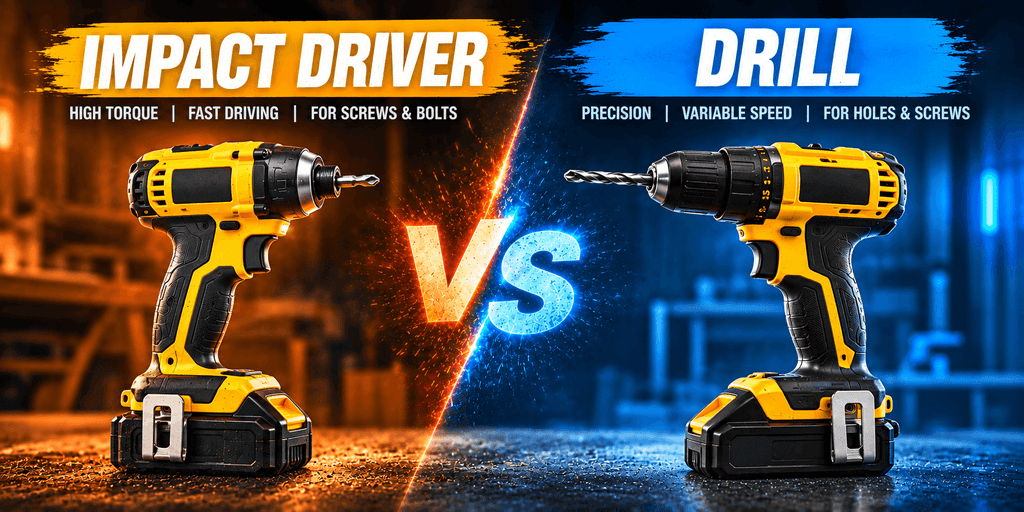
At first glance, a cordless drill and an impact driver can look almost identical. Both typically have a motor, handle, trigger, forward/reverse control, and rechargeable battery. However, the biggest visible difference is at the front of the tool: the drill has a chuck, while an impact driver typically has a 1/4-inch hexagonal quick-release collet.
A drill/driver is useful when you need to drill holes or drive screws carefully. An impact driver is designed to deliver high torque and rapid bursts of rotational force, making it especially useful for driving larger or longer screws and other fasteners.
That difference affects the types of bits each tool can use, how quickly bits can be changed, and the jobs each tool is best suited for.
The Drill Chuck
The chuck is the mechanism at the front of a drill that grips the bit. Drills have keyed or keyless chuck to hold the bits securely in place. Most modern cordless drills use a keyless three-jaw chuck.
The three jaws move inward or outward when the chuck sleeve is rotated. This allows the chuck to grip bits with different shank sizes.
For example, a drill chuck can typically hold:
- Twist drill bits
- Spade bits
- Brad-point bits
- Hole saws with compatible arbors
- Countersink bits
- Driver bits
- Other accessories within the chuck’s capacity
This is one reason a drill is such a versatile power tool.
How a Drill Chuck Works
The basic process is straightforward:
- Rotate the chuck sleeve to open the jaws.
- Insert the appropriate drill or driver bit.
- Rotate the sleeve in the opposite direction to tighten the jaws around the bit.
- Make sure the bit is centered and securely held.
- Select the appropriate speed and clutch setting.
- Pull the trigger to rotate the bit.
The adjustable chuck allows a drill to accept many different bit types and sizes.
The Impact Driver’s Quick-Release Collet
An impact driver uses a different bit-holding system. Instead of a conventional three-jaw chuck, most impact drivers use a 1/4-inch hex quick-release collet.
The collet is designed to accept compatible 1/4-inch hex-shank bits. Instead of loosening and tightening three jaws, the user can usually pull the collet sleeve forward, insert the bit, and release the sleeve to lock the bit in place.
This makes bit changes extremely quick.
Impact-rated driver bits such as Phillips impact bit, PH2 impact bit, Torx impact bit, T20 impact bit, T25 impact bit, etc. are specifically designed to withstand the repeated impact forces generated by an impact driver.
Drill/Driver vs. Impact Driver: How Torque Control Differs
How a Drill/Driver Controls Torque
A drill/driver typically has an adjustable mechanical clutch located behind the chuck. The clutch allows you to select a torque setting for fastening applications.
When the selected torque level is reached, the clutch slips instead of continuing to apply increasing torque to the fastener.
This makes a drill/driver useful when you need controlled fastening, particularly when working with smaller screws or materials that can easily be damaged.
Many modern drill/drivers also include multiple operating modes, such as:
- Driver mode: Uses the adjustable clutch for controlled screw driving.
- Drill mode: Bypasses the clutch to provide maximum available torque for drilling.
- Hammer-drill mode: On models equipped with this feature, adds a forward hammering action for drilling into masonry and similar materials.
The exact controls and modes vary by model.
How an Impact Driver Controls Torque
An impact driver uses a different approach. Instead of relying on a conventional adjustable clutch to limit torque, it uses an internal impact mechanism.
As resistance increases, the mechanism delivers rapid bursts of rotational impact to the fastener. These impacts allow the tool to produce high torque for demanding fastening applications.
When the impact driver senses resistance while driving a fastener, it activates a “super mode”:
- The motor begins to detach from the bit and reattach dozens of times per second
- This massively amplifies the force delivered to the fastener
- It also eliminates bit slippage and reduces strain on your arm
The impact mechanism also helps reduce the continuous reaction torque transferred to the user’s hand compared with simply applying equivalent torque through a conventional drill.
Why Impact Drivers Can Drive Large Screws?
An impact driver can drive large screws because it delivers extra rotational force in rapid impacts when the screw becomes difficult to turn.
A drill mainly gives you continuous rotation, while an impact driver combines rotation with repeated rotational impacts. That is why an impact driver can keep driving large screws when a drill may struggle or put much more twisting force into your hand.
How Does an Impact Driver Drive Large Screws?
Inside the tool, a hammer-and-anvil mechanism delivers repeated rotational blows to the output shaft. When a large screw encounters strong resistance, the mechanism allows the hammer to strike the anvil repeatedly, helping the screw keep moving.
This gives the impact driver an advantage when driving long or large screws into dense wood, where a regular drill may slow down or put more twisting force into your wrist.
The additional impact torque makes the tool particularly effective for:
- Long construction screws
- Large wood screws
- Structural screws
- Lag screws
- Deck and fence construction
- Heavy-duty fastening
- Removing stubborn fasteners
Impact drivers can often drive large, long screws without any pre-drilling — though pre-drilling is still recommended.
Can an Impact Driver Damage or Strip Screws?
Yes, an impact driver can damage a screw or fastener if the wrong bit, fastener, or technique is used.
The risk can be higher with fasteners that are relatively brittle or with applications where excessive torque is unnecessary. A bit that does not properly match the screw head can also slip or cam out, potentially damaging the fastener.
To reduce the cam out:
- Use the correct bit type and size.
- Use impact-rated bits with an impact driver.
- Keep the bit properly aligned with the fastener.
- Start at a controlled speed.
- Avoid continuing to drive once the fastener reaches the desired depth.
- Use an appropriate fastener for the material and application.
- Use a drill’s clutch when precise torque control is important.
It is therefore more accurate to say that an impact driver can damage certain fasteners when used incorrectly or when excessive torque is applied, rather than simply describing all impact drivers as likely to strip screws.
Can I Use the Same Bits in a Drill and an Impact Driver?
Not always.
This is one of those things that can cause frustration when you’re buying your first tool.
A drill/driver can accept a wide variety of bits through its chuck.
An impact driver is designed for compatible hex-shank accessories, and for demanding impact work you should use impact-rated bits. Never use Power Bits or Insert Bits in an impact driver.
The Impact Driver’s “Clutch” — And Why It’s Different
A drill’s clutch is a mechanical brake that physically disconnects the drive when resistance hits a set threshold. A simple analysis on drill vs impact driver for screws points out the differences.
An impact driver’s “clutch” is different — it is really just a power preset. You choose a low, medium, or high power mode before you start. The tool’s electronics limit speed and power to that level, but it does not automatically stop when the screw is seated. That is still entirely up to you and the trigger.
This is why trigger technique is everything on an impact driver. It is not an on/off switch rather a gas pedal.
The goal is to feather the trigger: press lightly as the screw starts to grab the material, then open up once it is seated and driving. And just as important is the stop — ease off the trigger as the screw approaches flush.
Slamming it home at full speed is the fastest way to overdrive and strip a screw hole.
Which Tool Should I Use for Bolts and Nuts?
An impact driver can handle some bolts and other fasteners, but it is important to distinguish it from an impact wrench. An important question arises: drill vs impact driver vs impact wrench which one to use for car or lug nuts?
An impact driver typically accepts smaller driver bits and is commonly used for screws and lighter fastening applications. An impact wrench is designed for higher-torque applications involving tight & awkward bolts and nuts.
So:
Use a drill/driver when the bolt is small and you want precise control. Its adjustable clutch can help prevent over-tightening or damaging the fastener.
Use an impact driver when you need more power for small-to-medium bolts and nuts, torqued bolts also wheel lug nuts. Its compact size also makes it convenient for general DIY work.
Use an impact wrench when you’re dealing with large bolts, specially for heavily tightened/seized fasteners such as suspension control arm bolts, caliper bracket bolts. Bolts that are awkward to remove like the ones for lawn mower blades. It is designed to deliver much higher torque than an impact driver.
Why the Impact Driver Does Not Replace a Drill
Although an impact driver is extremely effective at fastening, it is not simply a more powerful replacement for a drill.
A drill is generally more versatile because its chuck can accept many different accessories. Its adjustable clutch also provides better control when driving smaller screws into materials that can easily be damaged.
An impact driver is better suited to high-torque and repeated fastening, while a drill is better suited to general-purpose drilling and controlled fastening.
When to Use an Impact Driver to Drill?
An impact driver can be useful for large holes in wood, especially when a large bit or hole saw is likely to catch and twist your wrist.
The impact mechanism delivers force in short bursts, so it can be easier to control when the bit suddenly grabs.
However, a drill is usually better for clean, precise holes because it spins continuously. Use a drill when hole quality, accuracy, or a smooth finish matters.
Simple rule:
- Large, rough, hidden hole → Impact driver can work
- Clean, accurate, visible hole → Use a drill
Is an Impact Driver Easier on Your Wrist?
For some users, yes.
If you’ve ever driven a large screw with a drill, you may have felt the tool twist against your wrist. That’s because the drill continuously applies rotational force while the fastener is resisting it.
An impact driver’s internal mechanism changes how torque is delivered to the fastener. Instead of transmitting all of the reaction torque continuously through the tool, the impact mechanism delivers torque in rapid pulses.
An impact driver delivers much of its torque through rapid impact pulses. That changes how the reaction force is felt through the handle.
This can make repetitive high-torque fastening feel easier on the wrist for some users.
So if you’re driving dozens of long screws into a deck, the difference can become much more noticeable than when you’re driving one or two screws around the house.
A drill may produce more noticeable continuous reaction force during high-torque fastening, while an impact driver can feel more manageable during repetitive heavy-duty driving.
Which Is Heavier: a Drill or an Impact Driver?
Weight varies considerably between models, but compact impact drivers are often designed to be relatively short and lightweight.
A drill/driver generally needs a larger chuck, clutch, and associated mechanical components, which can contribute to a larger overall package.
For repetitive overhead or extended fastening work, the size and weight difference can become noticeable.
However, don’t choose solely by advertised weight. Battery size can significantly change the overall weight of either tool.
Cordless Drill Vs. Impact Driver: Quick Comparison
| Feature | Cordless Drill | Impact Driver |
|---|---|---|
| Chuck type | Chuck and jaws | Hex-shank collet |
| Primary use | Drilling holes | Driving fasteners |
| Force output | Constant torque | Rotary impact bursts |
| Arm strain | More | Less |
| Small fasteners | Better | Can damage/overtighten |
| Large fasteners | Struggles | Handles easily |
Pros & Cons of a Drill/Driver
Drill/Driver Pros
- Excellent control
- Adjustable clutch
- Very versatile
- Excellent for drilling
- Accepts a wide variety of bits
- Good for small and medium-sized screws
- Generally quieter than an impact driver
Drill/Driver Cons
- Can struggle with very long or large screws
- Heavy fastening can require more physical effort
- Less efficient for repetitive high-torque fastening
Pros & Cons of an Impact Driver
Impact Driver Pros
- High torque
- Excellent for long and large screws
- Fast repetitive fastening
- Compact and relatively lightweight
- Quick bit changes
- Useful for demanding construction fastening
- Can help reduce continuous torque reaction at the handle
Impact Driver Cons
- Less precise than a drill/driver for delicate fastening
- Louder when the impact mechanism engages
- Primarily uses compatible 1/4-inch hex bits
- Not as versatile for general drilling
- Can damage fasteners if used incorrectly or with excessive force
Why Many Pros & DIYers Own Both
When to use a drill vs impact driver? The answer is: a drill and impact driver complement each other rather than serving exactly the same purpose.
A common two-tool setup is to keep a drill equipped with a drill bit for making pilot or clearance holes while keeping an impact driver equipped with a driver bit for fastening.
This eliminates the need to repeatedly change between drilling and driving accessories.
According to pros –
- Use a cordless drill for drilling holes, smaller fasteners, and decorative screws
- Use an impact driver for heavy-duty driving, long screws, and difficult or stubborn fasteners
For example, when building a deck, you could use the drill to make a pilot hole and then use the impact driver to drive the long deck screw. The two tools can therefore make repetitive drilling-and-fastening work faster and more convenient.
FAQ
When Would I Actually Use an Impact Driver for Drilling?
Use an impact driver for drilling when you need to make holes in wood, metal, or other suitable materials while working with a compact tool. Use impact-rated drill bits designed for its 1/4-inch hex chuck.
Can I Use the Same Bits in a Drill and an Impact Driver?
Not always. A drill accepts many standard bits through its chuck. An impact driver requires compatible 1/4-inch hex-shank accessories. Use impact-rated bits when the accessory will experience impact forces.
Which One Is Better for Furniture and IKEA-Style Assembly?
A drill/driver usually works better for furniture assembly because its clutch gives you better control over screw depth and torque. An impact driver can work, but it may drive screws too aggressively and damage softer materials. Most importantly, you must have a good control over the tools.
Which One Should I Use for a Deck or Fence?
An impact driver usually works well for decks and fences because it handles long screws and repeated fastening with high torque. Its compact design also makes it easier to use during extended fastening jobs.
Drill or Impact Driver: Which One Should I Buy First?
Choose a drill/driver first if you need one versatile tool. It handles drilling and screwdriving with better control. Choose an impact driver first if your main work involves long screws, structural fasteners, decking, fencing, or heavy fastening.
Do I Need Both a Drill and an Impact Driver?
You do not need both, but owning both can make many projects easier. Use the drill for controlled drilling and delicate fastening. Use the impact driver for long screws, heavy fastening, and repetitive driving.
Can an Impact Driver Drill Concrete?
A standard impact driver is not designed for drilling concrete like a hammer drill or rotary hammer. You may find specialty accessories for limited masonry work, but use a hammer drill or rotary hammer for regular concrete drilling.
